Need help with Connected Services?
Welcome to your support hub. Watch quick guides, find answers, or get in touch with our team if you need extra help.
Toyota Connected features, explained.
Explore short videos about setup and selected safety and convenience features available with Connected Services.
Frequently Asked Questions
Connected Services
A collection of intelligent features that connect your Toyota and phone for seamless control, enhanced safety, and total peace of mind.
Toyota Connected Services will initially be available with the sixth generation RAV4. More models will be added progressively across the Toyota range from 2026.
myToyota Connect app updates will be available via the Apple App Store and Google Play Store.
Connected Multimedia systems receive software and firmware updates remotely via Over-the-Air (OTA) technology. This ensures that users always have access to the latest head unit features and functionality without needing to visit a Toyota Store.
The available features and services will come with a complimentary trial period of at least four years. After this trial, certain services will require a paid subscription. At that point, you can choose whether to continue or discontinue using the paid Toyota Connected features and services.[CS2]
Please note that when using the myToyota Connect app on your device, your mobile data may be used.
myToyota Connect App [CS1]
The myToyota Connect app allows you to remotely access selected vehicle information and controls, helping you stay connected to your Toyota even when you’re away from it.[CS1]
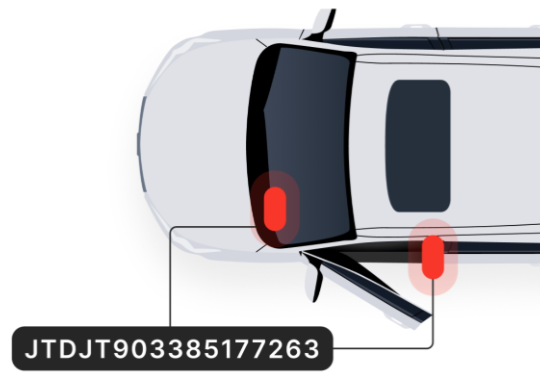
Your VIN is a 17-character code with both capital letters and numbers.
Your VIN is located on the inside of the front passenger door frame and can sometimes also be found on the lower corner of the windscreen. You can also find your VIN on vehicle documentation.
No, the myToyota Connect app is only currently applicable to Connected vehicles.
- Apple iPhones operating on iOS 17 or higher.
- Android phones operating on Android 10.0 or higher.
- Apple iPhones operating on iOS 17 or higher and Watch OS 10.0+
- Android phones operating on Android 10.0 or higher and Wear OS (watch) device running Wear OS 3 or higher.
Samsung Gear smartwatches are not supported because they use a proprietary operating system called Tizen®. Customers with a Samsung smartphone may be able to pair with some Android‑based smartwatch brands, but certain features may still be limited or incompatible
Many other smartwatch brands, such as Fitbit, Jawbone, Garmin, etc. also run on proprietary operating systems but remain incompatible for the use of certain features.
SOS Emergency Call [CS3]
In the event of a genuine emergency, help is just a press of the SOS button away, connecting you with the Toyota Emergency call centre. If required, the agent will contact emergency services (ambulance, fire and/or police) and provide them with your vehicle's location information. This service is available 24 hours, 7 days a week.
SOS Emergency Call is complimentary for the life of the Spark 4G/5G network (whichever is applicable) on models equipped with this capability.
SOS Emergency Call is enabled by default on compatible vehicles at point of sale, there is no setup requirement for this service.
These services can only be disabled by contacting your Authorised Toyota Dealer or the Toyota Customer Care team on 0800 869 682.
This service can assist with an emergency that is serious or life-threatening and requires immediate assistance from emergency services. Some examples include road accidents and medical emergencies. You can also use the SOS button if you witness an emergency to request help for those that require assistance.
No.
Automatic Collision Notification (ACN) [CS4]
If your vehicle is involved in a serious collision where an airbag deploys or impact sensors are triggered, ACN will initiate a voice call to the Toyota Emergency Assistance call centre. If required, they will contact emergency services (ambulance, fire and/or police) and provide them with your vehicle's location information. This service is available 24 hours, 7 days a week.
ACN is enabled by default on compatible vehicles at point of sale, there is no setup requirement for this service.
No, the service will only be available if the vehicle ignition is on.
When your airbags are deployed or impact sensors triggered, ACN can help if you need emergency assistance from police, fire or ambulance.
Where an ACN has occurred and the occupant is unable to communicate with the Toyota Emergency Assistance call centre, emergency services will be dispatched to the vehicle's location.
ACN works on the New Zealand mobile network. While this coverage is extensive, there may be situations where mobile signal is weak or unavailable, e.g. underground carpark or remote locations.
ACN is Dependent on 4G/5G enabled DCM, GPS signal strength, mobile network coverage, operational related components and other factors outside Toyota’s control which can limit the ability or functionality of system.
Stolen Vehicle Tracking (SVT) [CS5]
SVT is designed to provide you with enhanced vehicle security and peace of mind should your vehicle be stolen, and the feature is active. When SVT is activated, it may assist police with tracking your vehicle once you have reported it stolen and supplied a police report.
Please note: We cannot guarantee your vehicle can be found. While we will do our best to assist you, SVT’s effectiveness and availability may depend on various factors beyond Toyota’s control, such as mobile network disruptions, system outages or interference with vehicle systems and components.
Our Toyota Stolen Vehicle Assistance (SVA) call centre can only advise if the tracking is still active, or if deactivation has been requested by police or the individual who initiated the tracking.
To receive updates on the recovery of your vehicle you should contact the police directly, not the SVA call centre.
Once tracking is initiated, SVT will attempt to track the vehicle as long as there is mobile coverage, sufficient main vehicle battery power, or until a request to terminate the tracking has been made. However, certain factors beyond Toyota's control, such as network availability, system interruptions, interference with vehicle systems and components, may impact the effectiveness or continuity of tracking after it has commenced.
Should your vehicle be recovered, Police will contact you directly.
No.
SVT works on the Spark 4G or 5G network. While this coverage is extensive, there may be situations where mobile signal is weak or unavailable, e.g. underground carpark or remote locations. The SVT system will not work in these areas.
Although we aim to provide continuous access to SVT, there may be limitations and disruptions to service caused by various reasons, including the potential decrease of vehicle or communication device battery voltage (or disconnection), GPS signal strength, mobile network coverage, malfunctioning, damaged or broken components such as antenna, wiring or other related components required to deliver the service. Potential hardware or software failures, as well as interference with the vehicle’s system or components, may also affect the availability or effectiveness of SVT.
Accordingly, while we will do our best to assist you, we cannot guarantee your vehicle will be found.
No. This service is reserved only for the tracking of a stolen vehicle.
This feature will come with a complimentary trial period of at least four years. After this trial, certain services will require a paid subscription. At that point, you can choose whether to continue or discontinue using the paid Toyota Connected features and services.
We’re here to help
Reach us by phone, or send an online enquiry.
Connected Services General Enquiries
For any enquiries, questions or concerns relating to Connected Services, contact your local Toyota Store, call 0800 TOYOTA, or
send us an online enquiry
Stolen Vehicle Tracking (SVT)
Please have your police report number and VIN ready.
Call 0800 874 520 — available 24/7
Connected Services Account Enquiries
Connected Services account information can be managed and updated through the myToyota Connect app.
For further support, please contact 0800 TOYOTA
between Mon-Fri 8:00am-5:30pm
Next Steps
Ready to connect?
Download the myToyota Connect app to unlock smarter control, added peace of mind, and effortless connection with your Toyota.
Is my car compatible?
Discover which vehicles are compatible with Toyota Connected services
[CS1] Functionality and features depend on an active 4G/5G-enabled DCM (available until the 4G/5G network sunset, depending on the DCM fitted to the vehicle), compatible device and app installation/connection, mobile data (at user’s cost), GPS signal strength, New Zealand mobile network coverage, enabled push notifications, third-party information, and other factors outside Toyota’s control, which can limit system functionality. Mobile data usage is at the user’s cost. Features vary by vehicle model and subscription choice and may be subject to change.
[CS2] Different complimentary periods apply depending on the package and enabled DCM. Fees apply thereafter. Features depend on 4G/5G enabled DCM (available until 4G/5G sunset, depending on the applicable DCM fitted to the vehicle), third party information, GPS signal strength, New Zealand mobile network coverage, compatible device, mobile data (at user’s cost), enabled push notifications and other factors outside Toyota’s control which can limit functionality of system and may be subject to change.
[CS3] Driver assist feature only. Not a substitute for safe driving practices. Not available outside New Zealand, if service disabled or terminated, or after 4G/5G sunset. Only operates if vehicle’s SOS button is pressed and vehicle ignition is on. Dependent on 4G/5G enabled DCM, GPS signal strength, mobile network coverage, emergency response centre capabilities and other factors outside Toyota’s control which can limit the ability or functionality of system.
[CS4] Driver assist feature only. Ignition must be on. Not a substitute for safe driving practices. Not available outside New Zealand, if service disabled or terminated, or after 4G/5G sunset. Only activates if vehicle’s DCM detects airbag deployment or impact sensor notification. Dependent on 4G/5G enabled DCM, GPS signal strength, mobile network coverage, operational related components and other factors outside Toyota’s control which can limit the ability or functionality of system.
[CS5] Not available outside New Zealand, if service disabled or terminated, or after 4G/5G sunset (depending on the applicable DCM fitted to the vehicle). Dependent on sufficient battery power, 4G/5G enabled DCM, GPS signal strength, mobile network coverage, operational related components and other factors outside Toyota's control which can limit the ability or functionality of system. Owner/driver required to obtain Police report. Vehicle location information, if available, is only provided to Police. Vehicle recovery not guaranteed.
Google Play is a trademark of Google LLC.